Events
Events in the Analyze area (Behavior) — route /analyze/events.
Events lives in the Analyze area of the dashboard, under Behavior.
At a glance#
| Dashboard route | /analyze/events |
| Area | Analyze (analyze) |
| Group | Behavior |
| Platforms | Available for every app platform. |
What it does#
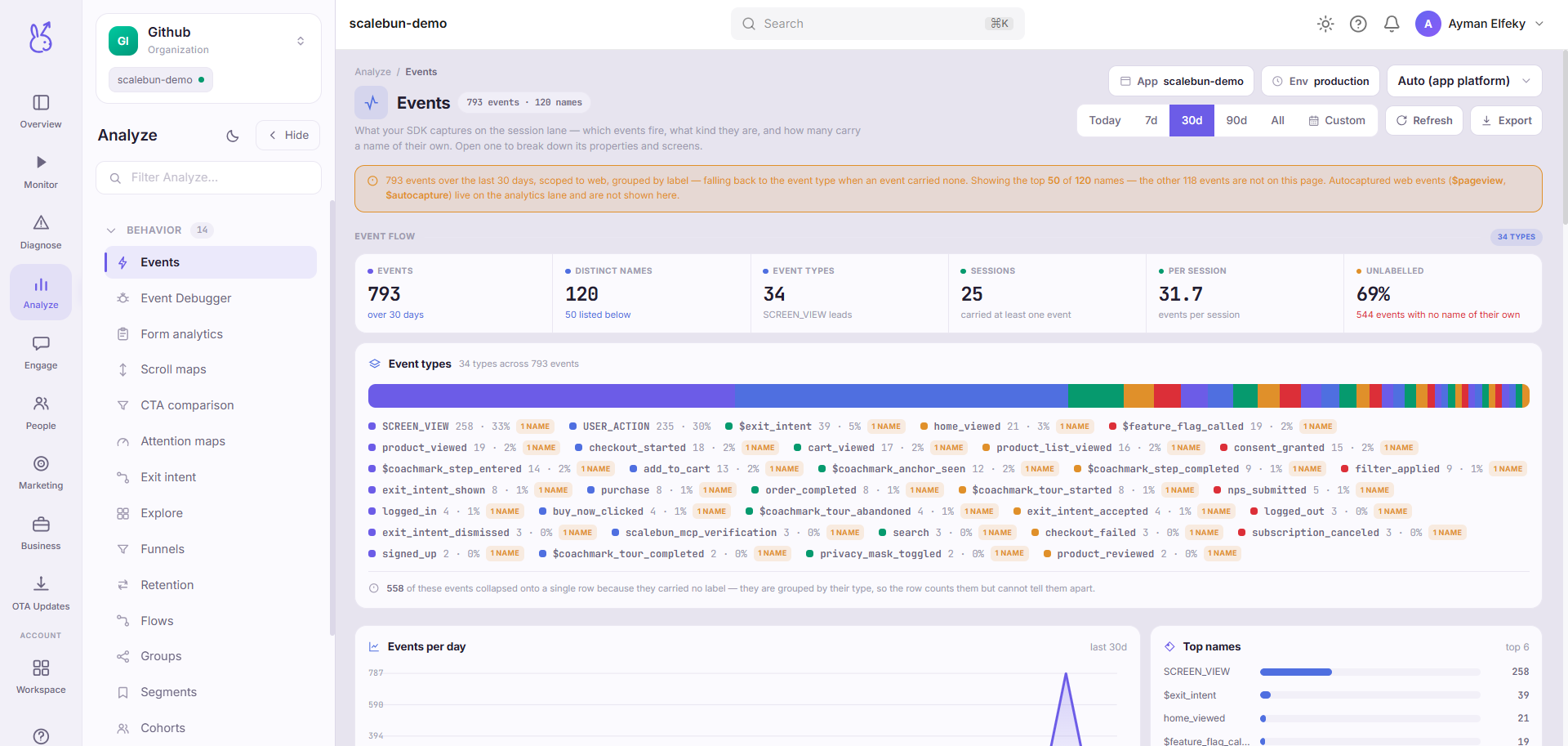
The events explorer is the inventory of what your app is sending: every event name, how often it arrives, and the KPIs derived from that over a selectable window. With nothing captured yet it says so and offers to send a test event, rather than showing an empty chart that looks like a failure.
When to use it#
First, after any instrumentation change. Before you build a funnel, a segment, or a dashboard on an event, confirm the event exists and arrives at the volume you expect. Building on an assumption about an event name is how a week of analysis ends up describing nothing.
Also as a periodic tidy-up. Event catalogues rot: renames leave both names live, experiments leave orphans, and a typo becomes permanent the moment something depends on it.
Workflow#
Send a test event on a fresh integration
The empty state offers it. It proves the whole path — SDK, network, ingestion — in one step, before you have written any real instrumentation.
Look for near-duplicate names
purchase_completed,Purchase CompletedandpurchaseCompletedare three events. Consolidate in code; you cannot merge them here.Check volume against your expectation
An event firing ten times more than it should is usually in a render path or an effect without dependencies. Ten times less is usually a code path that never runs.
Then go build on it
Once the name and volume are confirmed, Explore and the funnel tools are safe to use.
Permissions and prerequisites#
Requires the SDK initialised and tracking. See Events.
Limits and edge cases#
Names are as sent. There is no rename, no aliasing, and no normalisation. Consistency is a code discipline.
A high-volume event costs you. Events are metered — see Usage & billing — so an accidental event in a hot path is a bill as well as noise.
Empty is honest. No data produces an explicit empty state, never a zeroed chart.
Troubleshooting#
An event fires in my code but is not listed. In order: the SDK is not initialised at that point, the call is behind a condition that is false, or you are looking at the wrong environment.
A test event arrived and real ones do not. Ingestion works, so the problem is in your instrumentation rather than in the integration.
Where the data comes from#
From the SDK
Served by
Analytics
Tracking